Building Atlas: A Multi-Agent Workbench for Long-Running Tasks
Summary
The first design problem in Atlas was not how to start an agent. Starting an agent is easy. The harder question was what happens five minutes later, when several agents have touched files, one is blocked, another needs approval, a third has produced an artifact, and the user wants to know whether the run is healthy or drifting.
That is where normal chat interfaces start to break down. A chat log is a reasonable interface for short exchanges, but it is a poor control surface for long-running software work. It hides the state that matters: who owns which task, what tools ran, what is blocked, what needs a human decision, what output exists, and whether the system can be paused or resumed without losing the thread.
Atlas approaches the problem as a workbench rather than a chatbot. A run has a contract, a roster of agents, a graph of handoffs, progress state, approvals, blockers, artifacts, and an event stream. The UI can still show a conversation, but the conversation is no longer the source of truth. The run is.
Motivation
Most agent products inherit the shape of chat. That makes sense for short interactions: ask a question, get an answer, maybe run a tool. But software work is not usually one clean turn. It has phases, owners, blockers, files, artifacts, tests, approvals, and course corrections.
Once work becomes long-running, chat collapses too many different things into the same scrollback. A status update looks like a result. A blocker looks like commentary. A handoff is just a sentence. An approval request is easy to miss. Tool calls disappear into a transcript. The user has to reconstruct the run mentally.
Atlas was built around a different assumption: long-running agentic work needs a control plane. The important abstractions are not only messages. They are runs, agents, tasks, graph edges, blockers, approvals, tool calls, artifacts, memory candidates, and event streams.
Constraints
The system needed to support several constraints at once:
- Multiple agents with role-specific behavior.
- A planning phase before execution.
- Persistent run state that can be reconstructed.
- A graph of agent relationships and handoffs.
- Tool-mediated work rather than hidden side effects.
- Human approvals and blockers as first-class objects.
- File access and code execution with boundaries.
- Event streaming so UIs can observe progress.
- Model routing across different agent roles.
- Both web and native macOS control surfaces.
That set of constraints pushed Atlas away from a thin chat wrapper. The product had to look more like operations software: visible state, durable events, explicit controls, and structured recovery.
System Design
Atlas has three surfaces that should be understood separately.
The backend is the execution engine: a Node REST/SSE server, SQLite persistence, ARC orchestration, tool dispatch, and Docker-backed sandbox execution. It owns the authoritative run state.
The web app is a React/Vite control surface. It renders the run graph, timeline, approvals, blockers, and artifacts in the browser.
The macOS app is a native SwiftUI thin client. It does not run agents locally, does not own the SQLite store, and does not manage Node or Docker. It connects to a user-configured backend and gives Atlas a first-class Mac interface for planning, observing, and intervening.
The backend centers on a FullRun shape: config, execution contract, agents, communication edges, events, blockers, artifacts, approvals, memory candidates, and model routes. SQLite stores these as first-class tables, so a run can be reconstructed after execution instead of inferred from text.
Agentic Architecture
Atlas separates “decide what should happen” from “let agents work.”
The first stage is planning. A Mediator runs a back-and-forth planning conversation with the user. Its job is to clarify the objective, assumptions, risks, success criteria, and expected outputs. The important detail is that the Mediator is not supposed to emit an execution contract during ordinary conversation. The contract comes only after the plan is ready.
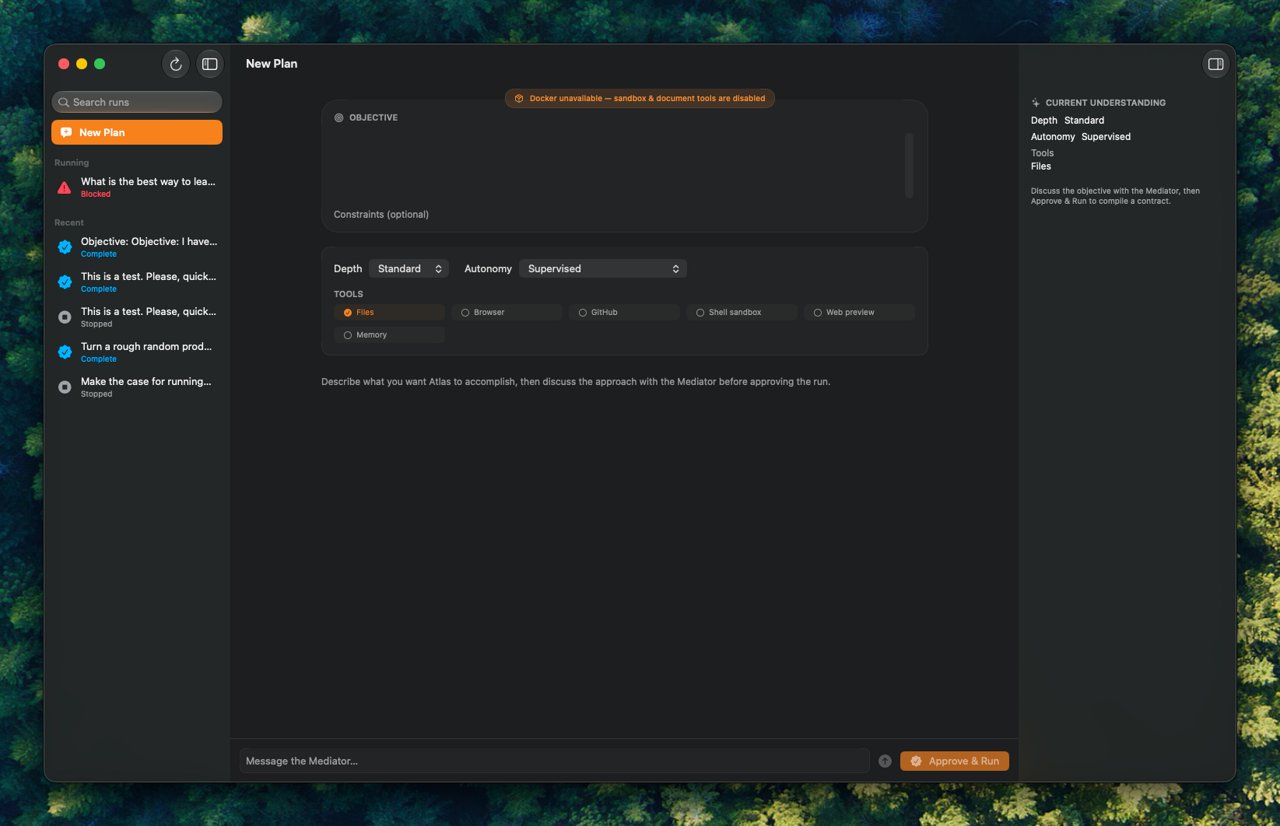
Once the user approves the plan, Atlas asks the Mediator for strict JSON. The server parses the contract, creates or updates a run, creates agent records, assigns initial tasks, stores the graph, and marks the run ready for execution.
The second stage is runtime orchestration. The orchestrator reads the execution contract and proposed graph, computes agent layers, and runs compatible agents concurrently. Each agent receives a role-specific prompt and a runtime block that names its workspace and tool surface.
The specialist roles are not generic “agents.” Atlas defines a Manager, Planner, Researcher, Builder, Critic, Verifier, Artifact Compiler, Memory Curator, and Integration Broker. Each role has a purpose, output contract, and anti-patterns. The Manager is not just another writer in the group; it is the coordinator, router, blocker resolver, and approval owner.
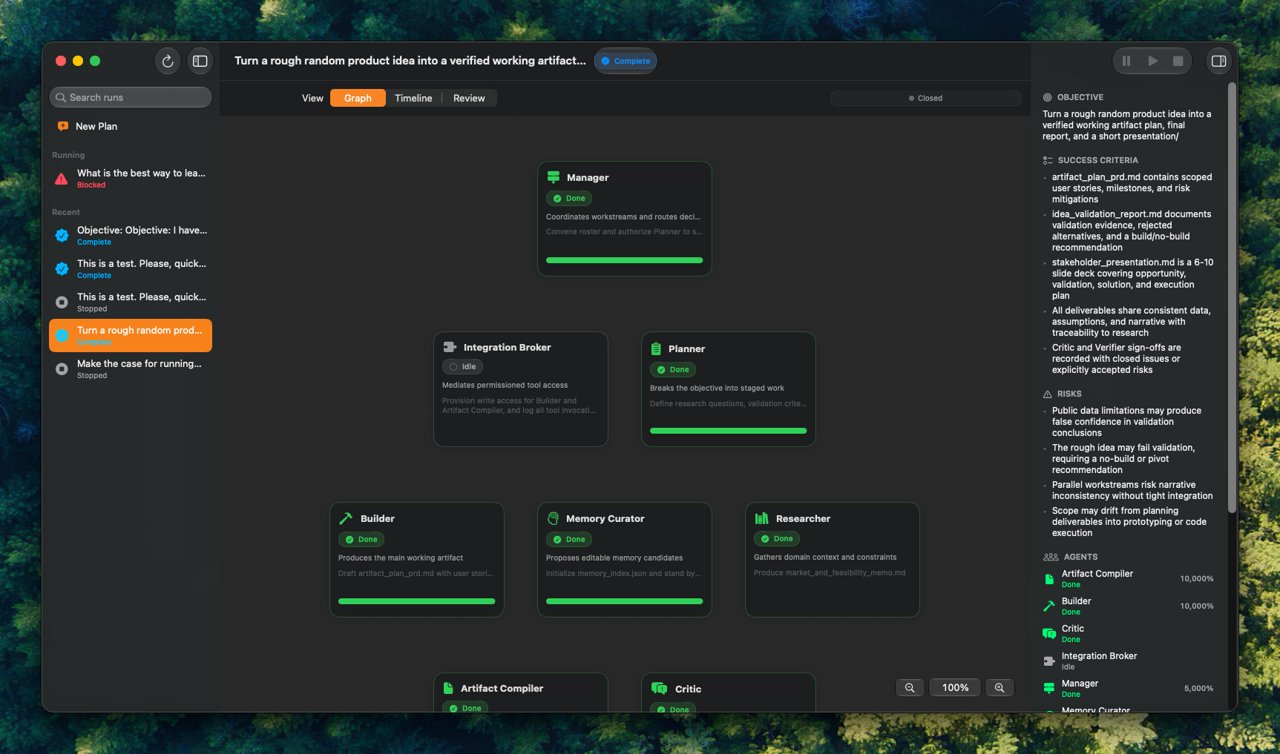
That role design matters because model output is cheap, but coordination is expensive. Without explicit responsibilities, a multi-agent system can turn into several chatbots narrating work at each other. Atlas tries to prevent that by giving each agent a job and making coordination visible in the run graph.
Tools As The Control Plane
The tools are the core of Atlas. They are how the system turns model output into inspectable state.
An agent can read, write, and list files within its workspace. It can run sandboxed Python. It can send messages, hand work to another agent, check in with progress, raise a blocker, request approval, escalate to the manager, and submit artifacts.
Those actions are not just text. A handoff persists a graph edge, updates the target agent’s task and status, emits an event, and wakes the target agent. A check-in updates status, current task, and progress. A blocker creates a blocker row and marks the agent blocked. An approval request creates a pending approval, marks the agent as needing approval, and pauses the run until the user decides. An artifact submission registers a concrete output tied to the agent that produced it.
This is the core difference from a chat interface. In a chat UI, an agent might say “I am blocked” or “I handed this off.” In Atlas, those are structured events with durable state behind them. The frontend can render them as graph edges, side-rail blockers, approval banners, timeline entries, and artifact panels because the backend does not treat the transcript as the database.
Persistence And Replay
Persistence is one of the strongest parts of the architecture. SQLite stores runs, agents, events, artifacts, edges, blockers, approvals, memory candidates, and model routes. The backend reconstructs the authoritative FullRun from those tables.
That makes the UI less fragile. A streaming event can tell the client that something changed, but the UI does not need to trust that single event as the whole truth. It can refetch the run and reconcile against persisted state.
That pattern shows up clearly in the macOS app. RunSession opens the run SSE stream, treats frames as change notifications, refetches FullRun, reconnects on drop, and polls as a fallback. This is a good example of Atlas’ philosophy showing up in client code: event streams make the app feel live, but the persisted run is still authoritative.
Sandboxing And Boundaries
Agent systems need boundaries because tools turn model output into action. Atlas handles this in a few ways.
File tools route through path resolution that confines agents to their own workspaces unless manager-approved access is supplied. Artifact submission checks file size, MIME type, encoding, and path confinement before registering output.
The Python tool delegates to Docker when available and refuses execution when Docker is unavailable. The runner uses a constrained container setup: no network, non-root user, read-only root filesystem, tmpfs, dropped capabilities, no-new-privileges, memory/CPU/PID/file limits, output caps, and timeout kills.
That is real isolation work, but it should still be framed carefully. It is a defensive sandbox implementation, not a blanket claim that arbitrary untrusted code execution is solved forever.
The macOS App: A Native Control Surface
Atlas started with a web UI, but the macOS app changes the product argument. It shows that the core interface is not the browser or the chat transcript; it is the control plane.
The native app is a thin SwiftUI client over the same REST/SSE backend. It does not run agents itself, does not own the SQLite store, and does not bundle Docker. Instead, it treats the backend as the execution engine and focuses on giving the user a first-class Mac surface for planning, observing, and intervening.
The app state is organized around AppModel, which owns settings, Keychain-backed ARC credentials, REST and streaming sessions, backend health, the run list, and sidebar selection. Non-secret settings such as backend URL, ARC base URL, and per-role model choices live in UserDefaults; the ARC key lives in the macOS data-protection Keychain. That split is small but important: the native app can authenticate user-supplied ARC calls without teaching the backend to persist secrets.
The main workspace uses a three-column SwiftUI layout: runs sidebar, active plan or run view, and an inspector. Planning is handled by PlanSession, which streams Mediator tokens into the conversation, then compiles the approved conversation into an execution contract and starts the run. Running work is handled by RunSession, which opens the run SSE stream, treats frames as change notifications, and refetches the authoritative FullRun.
The signature native screen is the run graph. Rather than wrapping the React graph, the SwiftUI app ports the graph layout into AtlasCore and renders nodes and edges with SwiftUI Canvas, TimelineView, gestures, and native controls. Active edges animate. Nodes show agent status, role, current task, and progress. The graph is not decoration; it is the operational map of the run.
Model Routing
Atlas treats model choice as part of orchestration. Different roles can be assigned different models. The backend has default per-agent model assignments, and the macOS settings expose model choices per role. PlanSession sends those model choices into contract creation.
The right claim here is practical per-agent model routing, not a fully mature model-routing analytics platform. The data model has room for model route records, but I would avoid claiming detailed runtime route auditing unless that gets implemented and surfaced more completely.
The architectural point still matters: multi-agent systems should not assume every role needs the same model. A Researcher, Builder, Verifier, and Artifact Compiler may have different cost, latency, and reasoning needs. Model routing belongs in the control plane, not as a hidden constant.
Interruptibility
Interruptibility is layered rather than magical.
Atlas has run-level pause, resume, and stop endpoints. Approval gates suspend an agent loop. SSE plus refetch makes state visible while work runs. User instructions can be appended to a run. The macOS toolbar exposes pause/resume/stop controls when a run is selected.
The limitation is important: I would not claim arbitrary mid-token or mid-tool cancellation. Atlas is better framed as interruptible at orchestration boundaries: run controls, approval waits, event append, resume behavior, and stop/pause checks. That is already a useful improvement over a passive chat transcript, but it is not prompt surgery inside every already-running agent context.
The Hardest Part
The hardest part was not launching agents. It was deciding how the manager should coordinate, interrupt, and observe them without turning the system into an opaque chat log.
Launching several models is simple. Making their work legible is the actual product problem. Who owns which task? What changed? What tool ran? Why is this blocked? What output should I review? Can I stop this run before it drifts? Can I reload the page and reconstruct what happened?
Atlas’ answer is to make the operational objects explicit: manager, specialists, graph, tools, approvals, blockers, artifacts, stream, persistence, and native observability.
Tradeoffs And Limits
The design buys observability at the cost of more machinery. Atlas needs strict data shapes, a persistent store, event streams, tool schemas, role prompts, graph layout, approval semantics, and client reconciliation logic. It is a larger system than a chat wrapper.
Some parts are intentionally incomplete. File tools, sandboxed Python, handoffs, approvals, blockers, check-ins, artifacts, SSE, and SQLite reconstruction are implemented and tested. Browser and GitHub appear in the permission vocabulary, but the execution plan describes them as future integration work. Memory candidates are represented and persisted, but the repo does not yet justify claiming a mature long-term memory product. Live instructions can be appended to a run, but the current evidence supports careful framing: they are persisted and can be followed by resume/refetch behavior, not guaranteed injection into every already-running agent context.
That honesty makes the case study stronger. Atlas is not interesting because it claims every agent feature is done. It is interesting because it identifies the right control-plane objects for long-running agentic work and implements enough of them to make the architecture concrete.
Results
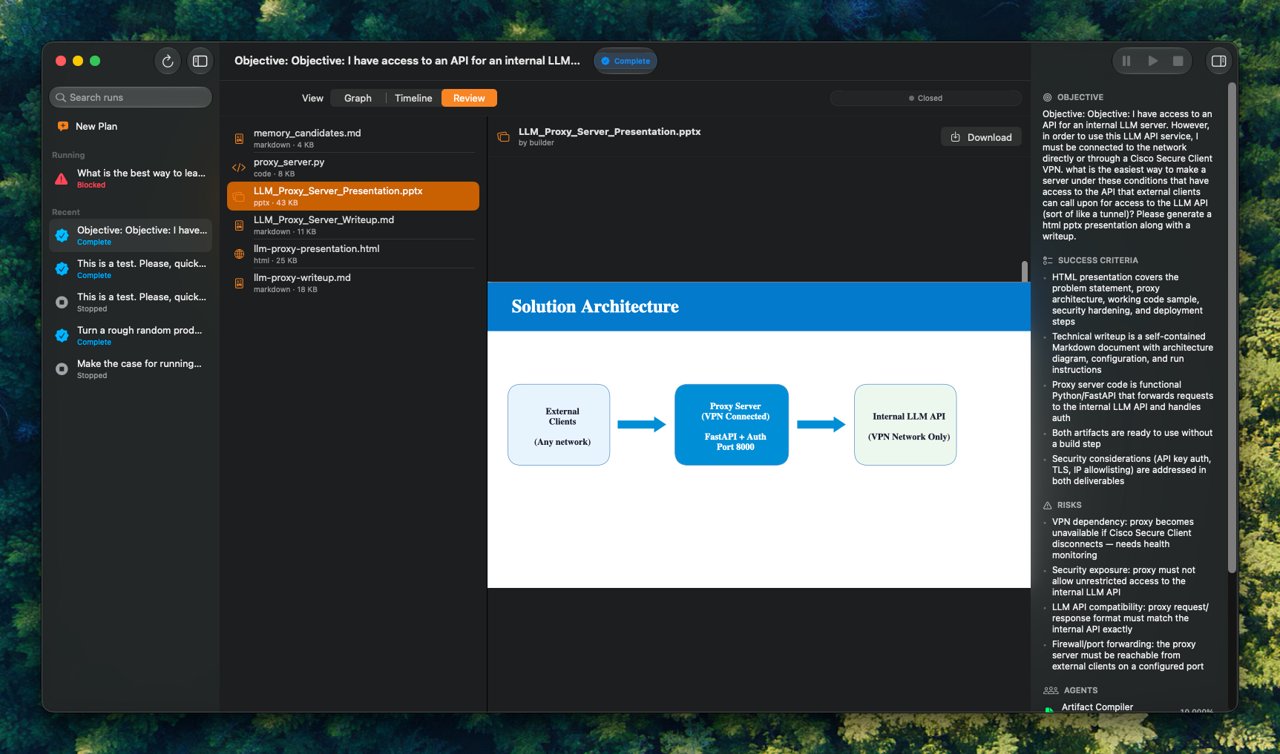
The strongest evidence that the pieces compose is the orchestrator integration test. It scripts a run where the Builder writes a draft, attempts a path escape that is refused, hands off to the Verifier, pauses for approval, resumes after approval, writes a final artifact, streams events, and reloads the completed state from SQLite.
That test is more convincing than a demo claim because it exercises the system’s intended failure modes: path escape, approval pause, artifact persistence, SSE, and reconstruction.
The macOS app also strengthens the result. Atlas is not only a backend experiment or a web graph demo. It has a native SwiftUI client with typed networking, Keychain credential handling, SSE-driven run sessions, native graph rendering, and tests around graph layout.
What I Would Change
I would make live instruction semantics sharper. If user instructions are appended to a run, the UI should make clear whether they affect the next scheduling point, the next agent turn, or an already-running loop.
I would make model routing more observable. Per-role routing is useful, but route history should be visible enough that a user can understand why a model was chosen, what it cost, and whether a cheaper or stronger route would have been better.
Takeaways
Long-running agent work needs product surfaces that look more like operations software than chat. The useful abstractions are not “assistant says X” and “user says Y.” They are run state, ownership, dependencies, tool calls, approvals, blockers, artifacts, recovery, and control.
Atlas is an attempt to make those abstractions visible enough that a human can manage agentic work instead of scrolling through it. The macOS app reinforces that idea: the final shape of agent UX may not be a chat window at all. It may be a native control surface for planning, observing, interrupting, and reviewing work done by a team of specialized agents.